If your ticket delivery link directed you to SpotHero, you’re in the right place. This guide walks you through how to view and use your parking pass, whether it’s license-plate–based or includes a scannable QR code.
Step 1: Open the SpotHero Parking Pass Link
Unlike some other delivery methods, you will not receive a separate email directly from SpotHero.
Your parking pass is accessed through the delivery email sent to you, which includes a direct link to SpotHero.
Click the link to open your parking pass in your mobile browser or the SpotHero app.
If the link opens successfully, no additional email search is required.
Tip: If you do not see the email from GoTickets in your inbox, spam, or trash folder, contact us via live chat.
Step 2: Review Your Parking Pass Details
Once the pass opens, you’ll see your reservation details, including:
Location and address
Entry and exit times
Parking instructions
Do not modify the entry or exit times. These are set by the facility and changing them may invalidate your pass.
Step 3: Add Your Vehicle Information (If Required)
Some SpotHero passes are validated by license plate instead of a QR code.
If you see a message indicating that a license plate is required, you must enter the exact plate number of the vehicle you will be using.
This step is critical — incorrect or missing vehicle information may result in towing or denied access.
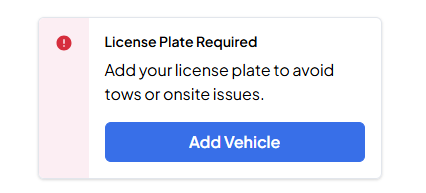
If your pass does not prompt you to add a vehicle, you can move on to the next step.
Step 4: Use Your Pass at the Location
Your SpotHero pass will be one of the following types — both are valid:
License Plate–Based Pass
Your vehicle is verified by the plate number on file.
No scanning is required as long as the correct plate was entered.
QR Code Pass
A scannable QR code will be displayed on your pass.
You can scan the code directly from your phone when you arrive.
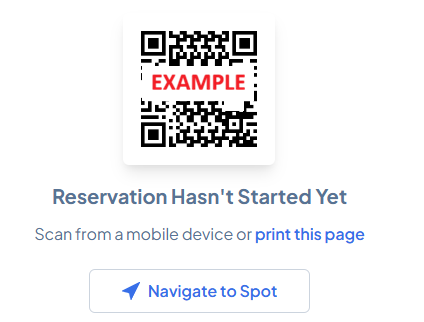
No printing is required unless you prefer a backup copy.
Important Notes
Clicking “Request Cancellation” within SpotHero does not cancel your order or void the transaction.
Any questions about cancellations, changes, or issues should be directed to our support team, not SpotHero.
Need Help?
If you’re having trouble opening the link, adding your vehicle information, or accessing your parking pass, start a live chat with us. We’ll make sure everything is set before you arrive.
Was this article helpful?
That’s Great!
Thank you for your feedback
Sorry! We couldn't be helpful
Thank you for your feedback
Feedback sent
We appreciate your effort and will try to fix the article